Construction law Intake

Keep track of new construction enquiries

Defective work, an abandoned site or delayed delivery of an off-plan home: each inquiry comes with documents and dates to review. Lorne & Vale prepares a brief for your firm. Your lawyer assesses the situation and decides the next step.

  • Human review on everything
  • No legal advice
  • Live in 7 days
  • Isolated per firm
Paul Fletcherpaul.fletcher@example.invalid
Cracking and water ingress since completionHello, practical completion on our house was certified three years ago. Cracks now run across the front elevation and water has been coming through the roof since the last storms. The contractor has stopped answering my letters. Could you call me back?
Direct email · a weekday eveningThe office is closed
Fictional person, address reserved for examples.
  1. Received
  2. Structured
  3. Routed
  4. Acknowledged
  5. On the iPhone
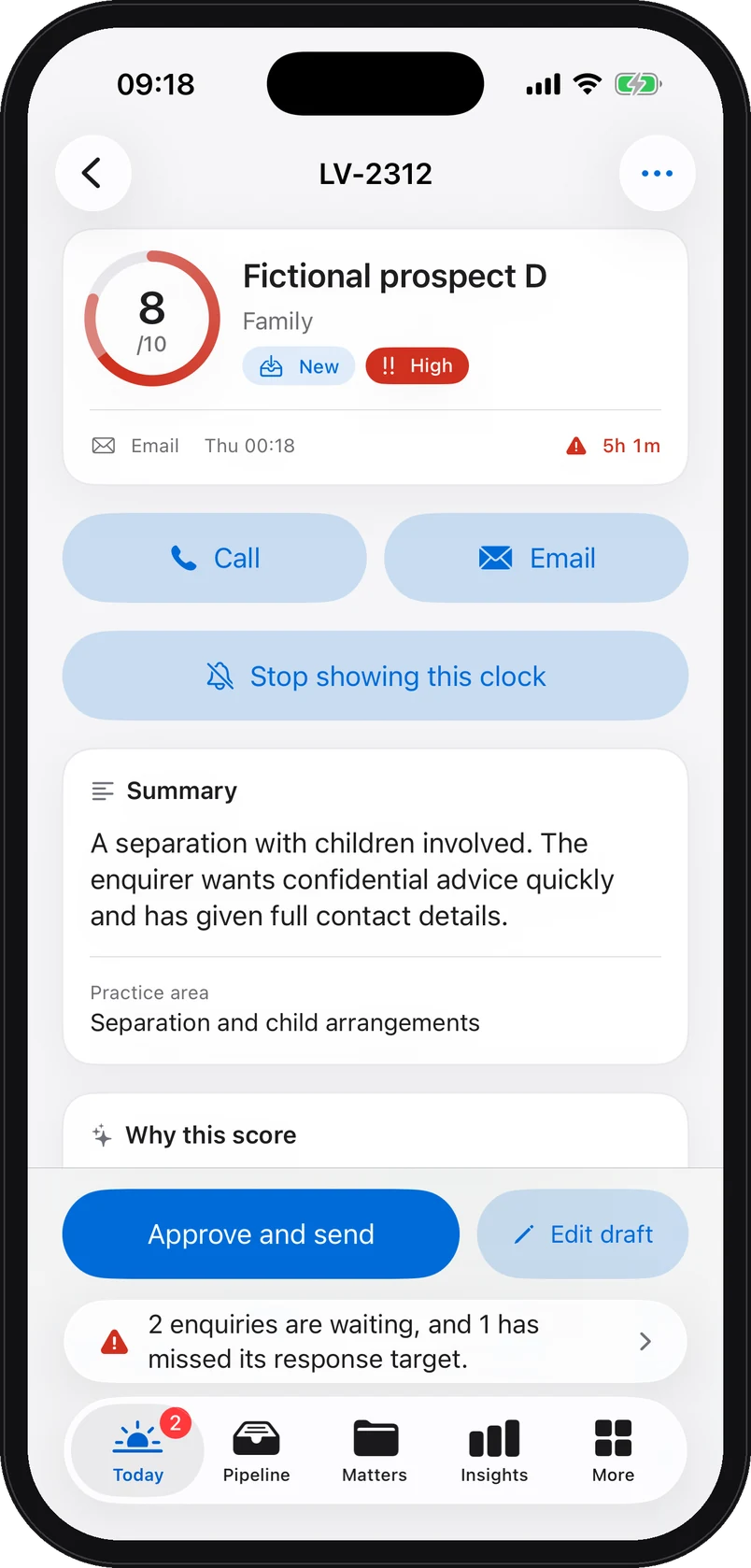
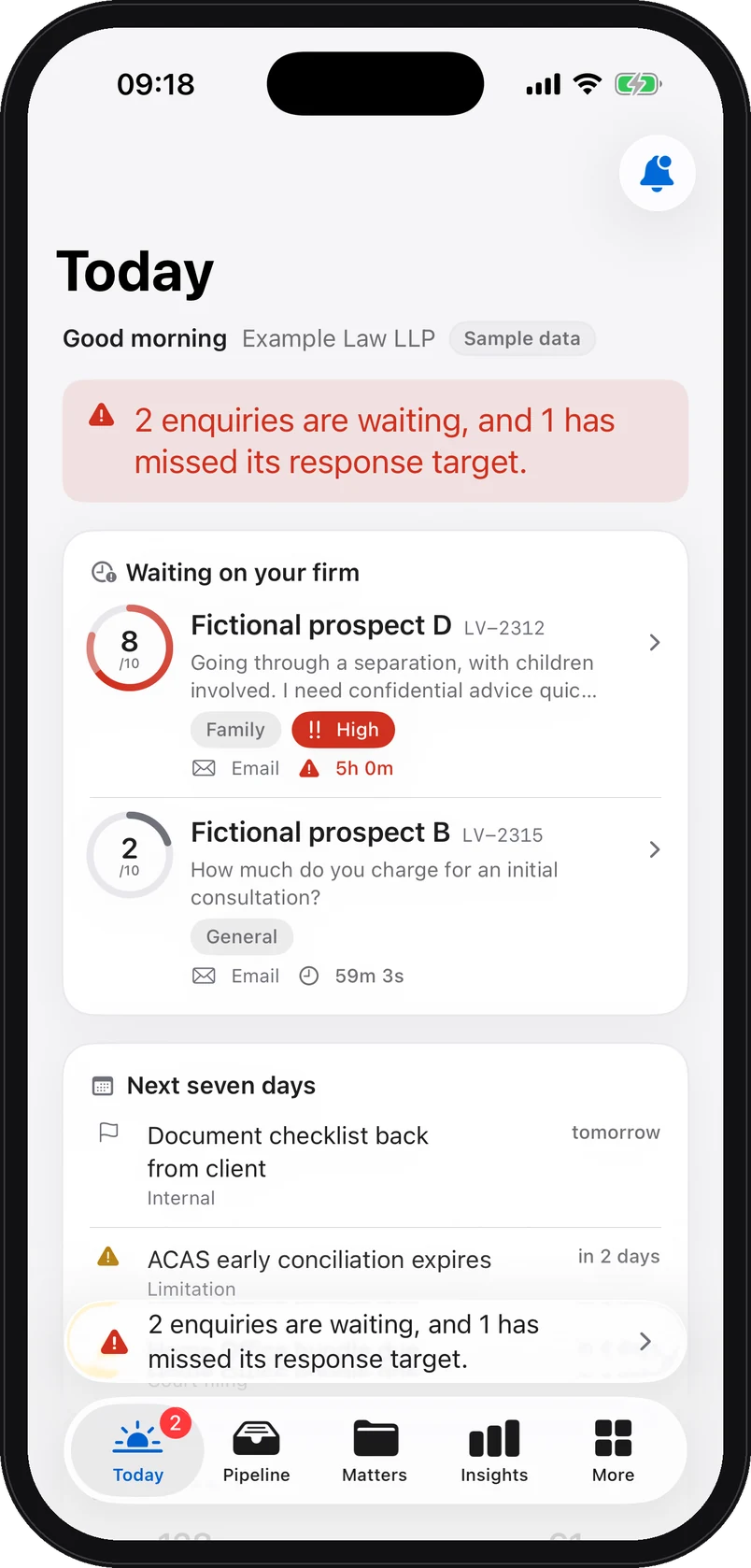
iPhone app screenshot with demo data: Today screen: two enquiries waiting on the demonstration firm, the first a family-law enquiry from a fictional prospect scored 8 out of 10, high urgency, with its countdown.

Web platform view and iPhone app screenshots. All demo data is fictional. The screens show the sample data available, a family law enquiry; the triage grid is the same in construction law.

A week in a construction law firm

Three situations you will recognise

Every enquiry arrives with an inquiry brief: summary, urgency, parties to check, missing information, documents to request. Here is what it would surface.

Defects after acceptance of the works

Fictional example: “Our house was accepted three years ago. Cracks run across the façade, water comes through the roof and the contractor no longer replies.”

Information to prepare for review
Human review
The lawyer checks the situation, urgency and applicable time limits.
Parties to check
The project owner, contractor, project manager and construction insurer.
Missing information
Acceptance date, recorded reservations, any insurer notification and any court-appointed expert procedure.
Documents to discuss
Acceptance record, contract, dated photographs and any existing expert report.
A contractor who has left the site

Fictional example: “Nobody has returned to the site for six weeks. Rain is getting in and we have already paid 70% of the contract.”

Information to prepare for review
Human review
The lawyer checks the situation, urgency and applicable time limits.
Parties to check
The project owner, contractor, subcontractors, project manager and insurer.
Missing information
Last attendance, sums paid against progress, formal notices and any insolvency proceedings.
Documents to discuss
Contract and payment schedule, invoices, payment records, correspondence and dated photographs.

Delayed delivery of an off-plan apartment

Fictional example: “Our apartment was due in the second quarter. The developer has announced another delay and we are paying rent as well as the mortgage.”

Information to prepare for review
Human review
The lawyer checks the situation, urgency and applicable time limits.
Parties to check
The buyer, developer-seller and main contractor where relevant.
Missing information
Contractual delivery date, reasons given for delays, contractual penalties and payment calls.
Documents to discuss
Off-plan sale deed and specification, payment schedule, delay notices and evidence of the losses claimed.

Illustrative examples, fictional people. What a brief contains depends on the enquiry received. The brief summarises, scores and flags; it does not advise and it decides nothing. Someone at the firm assesses the merits and replies.

Demonstration

A demonstration on a fictional enquiry

The demonstration enquiry available is a family law one: Charlotte Bennett, a fictional person, writes to the demonstration firm at 22:47. We show it as it is, rather than dressing it up as a construction file. What matters here is the grid: it is the same from one practice area to the next, and only the headings change.

The enquiry brief

What the lawyer reads before deciding

The same grid at 2 pm and at 11 pm. Nothing is decided in their place.

  • A score out of 10, a qualification level and a priority, with the score rationale in plain words. On the demonstration screen: 8 out of 10, hot, priority P1, because the situation is described clearly and the request for quick advice is explicit.
  • Practice area, routing and next step. In construction law, the practice area surfaces the kind of defect or dispute and the stage the works have reached; the suggested first contact is the partner on the construction team; the recommended step is a call within one working day.
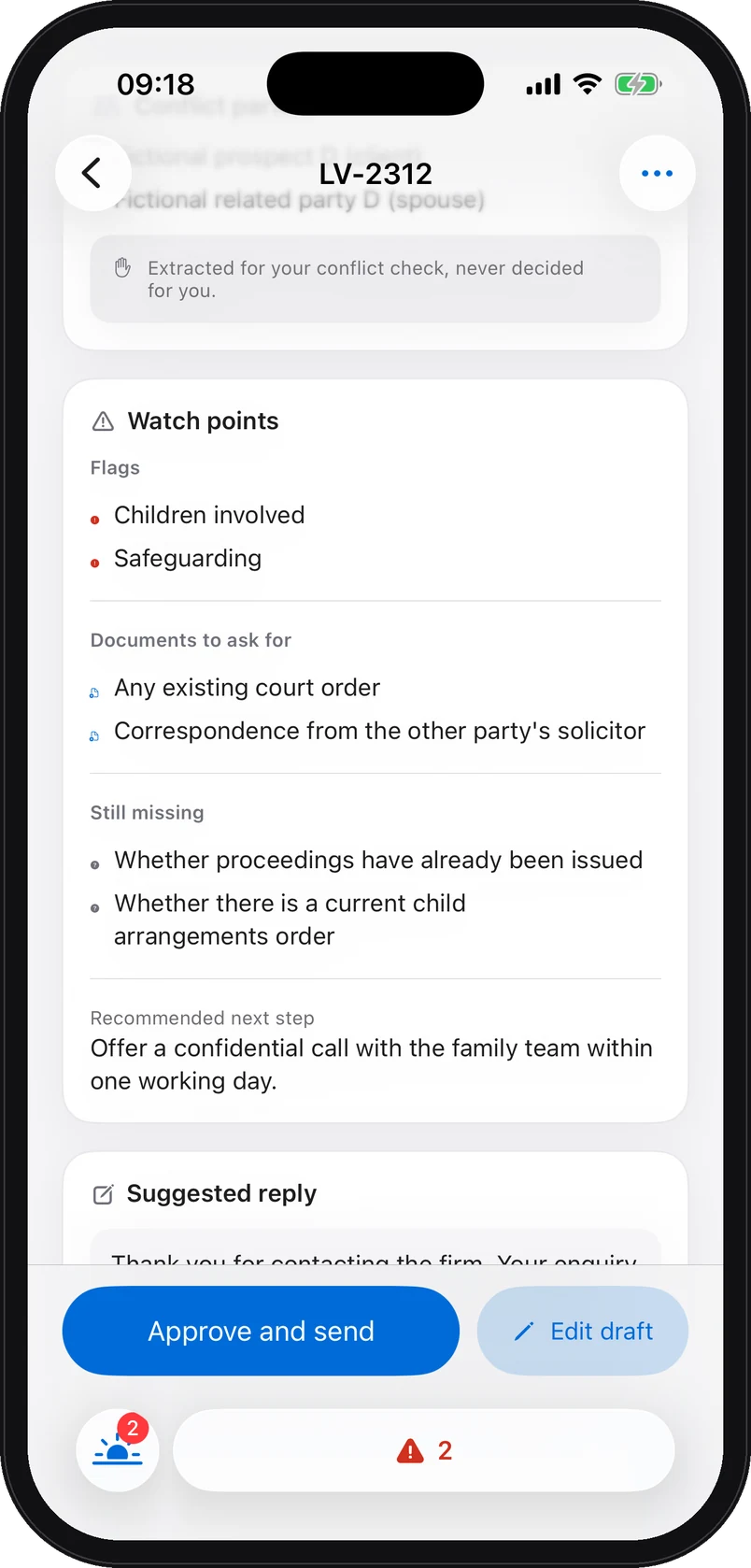
  • Needs attention and missing information. On a building contract: the date of practical completion, the defects listed at completion, the sums certified against the sums paid, and whether an insurer has already been notified.
  • Documents to request. The contract, the payment notices, the completion certificate, dated photographs and any expert report: the list goes out with the brief, before the first meeting.
  • Counterparties and conflict check. Employer, contractor, insurer: each party is named for your own search, extracted by the model and requiring human verification.

The person’s identifiers are replaced by tokens before any model call. Names are restored only inside your firm’s database.

iPhone app screenshot with demo data: The enquiry brief on iPhone: watch points, documents to ask for, missing information and the recommended next step, on the fictional demonstration enquiry, in family law.
On the iPhone

The same brief, in the partner’s pocket

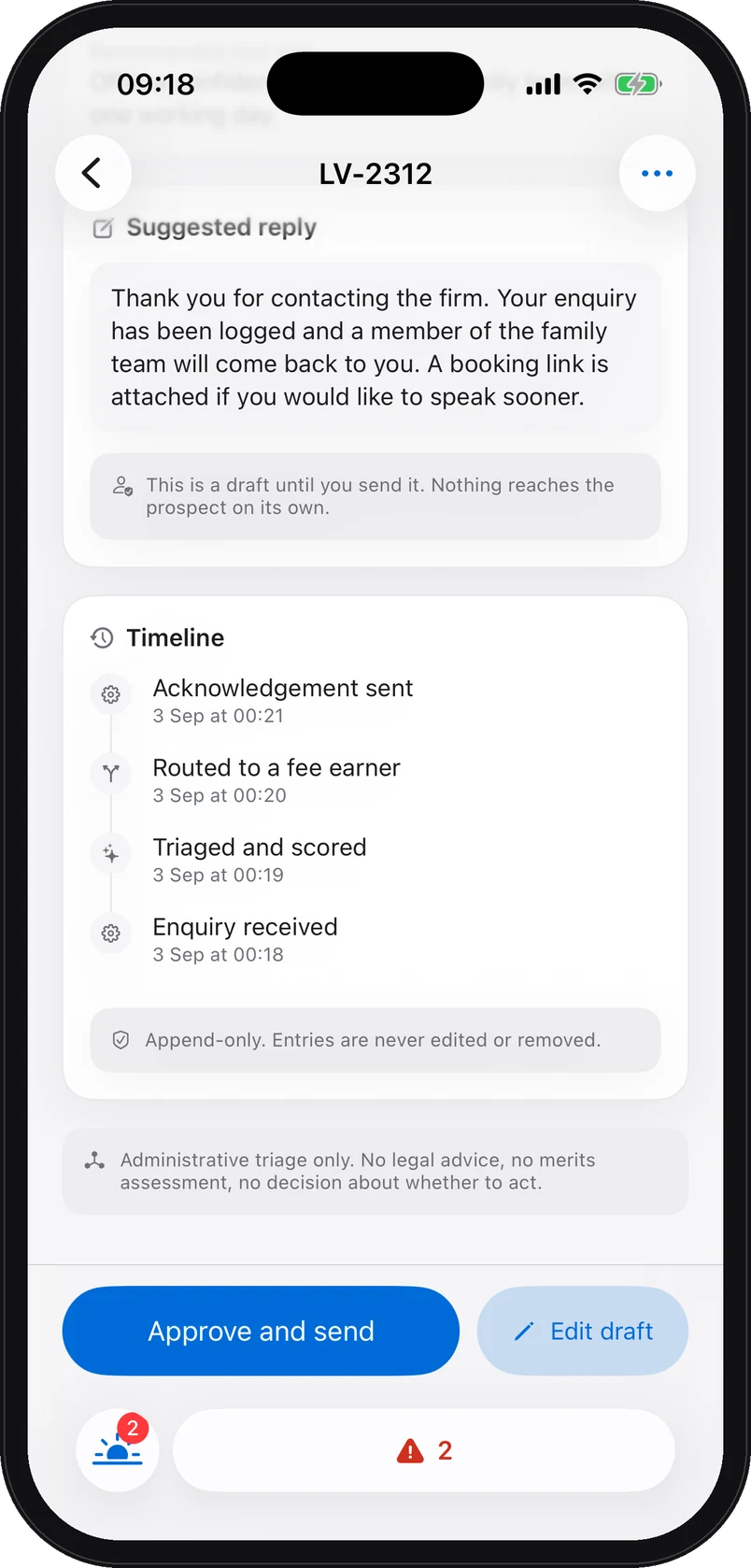
What is waiting, with its countdown. A suggested reply, marked as a draft. Two buttons: Approve and send, Edit draft.

  • A countdown on the lock screen, if the partner asks for it, and a reminder half an hour before the response target runs out. The reminder names a practice area and a score, never a client.
  • Draft replies for review The suggested reply only goes out if a lawyer approves or edits it. The only thing that leaves on its own is the acknowledgement, in wording approved at setup.
  • An append-only history: received, triaged and scored, routed to a fee earner, acknowledgement sent. Corrections add a new entry. Retention and deletion follow the applicable schedule.
  • Face ID locks the app as soon as it goes to the background.
iPhone app screenshot with demo data: The enquiry brief on iPhone: score 8 out of 10, a fictional prospect, family practice area, high urgency, summary, and the Approve and send, Edit draft buttons.
iPhone app screenshot with demo data: The suggested reply on iPhone, marked as a draft until it is sent, and the append-only timeline of the enquiry: received, triaged and scored, routed to a fee earner, acknowledgement sent.

Web platform view and iPhone app screenshots. All demo data is fictional.

Your figures

Compare fees and subscription costs

An illustrative calculation using the assumptions published for France.

Example for a firm of 3 to 9 lawyers
Incoming inquiries per month20
Assumed share missed or answered too late30%
Assumed conversion after timely handling25%
Assumed gross fees per matter€5,000
Annual Structure subscription, excluding VAT€13,800
Gross fee equivalent of the annual subscription3 matters

20 × 30% × 25% × 12 = 18 matters. 18 × €5,000 = €90,000 in gross fees.

These are assumptions, not measured results or a forecast of new matters. Replace them with your own figures. Setup fees, delivery costs and collection are excluded. Gross fees are not profit.

Before deciding

Use your own intake records

Review inquiries received, first-response times, follow-up owners and missing information. The pilot scope should address an observed need in your firm.

Security and confidentiality

Enquiries this sensitive, handled as such

Four controls you can verify, described without superlatives.

Pseudonymisation before model calls

Names, emails, phone numbers and other identifiers are replaced by tokens before an enquiry reaches a model. Encryption of the mapping depends on the deployment, as described on the security page.

Isolated per firm

Every client-data table carries a per-firm access rule, checked by automated tests on every change.

Documents sealed in the browser

Every document is encrypted before upload under two key exchanges, X25519 and ML-KEM-1024. Uploads are bounded, type-checked and content-inspected: embedded programs are refused.

Chained, signed audit trail

Sensitive actions are hash-linked and the head of the chain is signed daily with ML-DSA-87. The iPhone app verifies the signature on the device.

What we do not claim: no SOC 2 or ISO 27001 certification, and no external penetration test to date. Hosting on Supabase (EU, Ireland) and Vercel; the model is called through a server-side proxy, with no training on your data under OpenAI’s default policy.

Pricing

A flat fee for the whole firm

Construction law is the included practice area. An additional area costs €295 per month. No per-user or per-inquiry charge. Setup costs €2,950 for Cabinet and Structure, or €3,950 for Association, including €600 at signature. The balance follows the No-Miss Guarantee terms. All prices exclude VAT.

Live in 7 days, a 60-day pilot then month to month, cancel any time, export your data any time. Read the guarantee in full.

Intake audit 15 minutes

See what this would change in your firm

Fifteen minutes with a founder. Your channels, your volume, your construction law enquiries. You leave with a costed estimate and a clear answer, including if it is not for you.

Prefer to write first? contact@lornevale.com